“Laser is accurate, infrared is fast” is useful shorthand, but it is too simplistic. Field of view, tracking, working distance, ambient light and surface response matter too.
How optical scanners measure
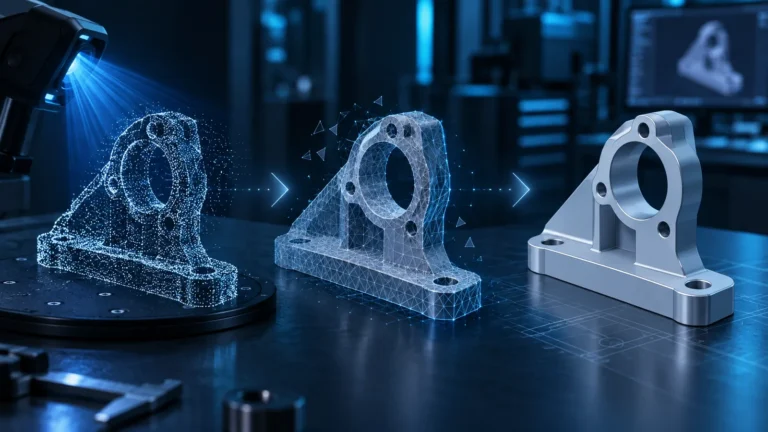
A projector creates a known pattern and cameras observe how that pattern deforms on the object. Depending on the system, the pattern may be parallel/crossed laser lines, dots or another structured-light pattern.
Blue laser lines
Current blue-laser modes are commonly aimed at engineering detail. The Raptor Pro uses seven parallel lines for HD work and 22 crossed lines for faster coverage, which suits edges, bores and technical surfaces.
NIR and structured light
NIR means near infrared. Structured-light systems can capture a larger area per frame. The CR-Scan Otter uses infrared structured light and supports geometry, marker and texture alignment.
Why hybrid scanners are compelling
A broad NIR pass can establish the shape of a large component, followed by a detail laser pass for clips, bores and interfaces. Software alignment between the datasets is critical.
Tracking is the hidden differentiator
A scan can be locally detailed yet globally distorted if tracking slips. Smooth, symmetric and repetitive geometry is difficult; markers provide unique references.
Ambient light
Optical scanners compete with environmental illumination. Outdoor capability can vary by mode, so manufacturer limits should be read for the exact scanning mode.
Practical selection
| Project | Good starting point |
|---|---|
| Small spare part | laser detail mode |
| Large dashboard | NIR or fast cross-line mode + markers |
| Body/figurine | NIR/structured light |
| Black plastic | dark-surface-capable mode, coat only if needed |
| Chrome/glass | plan surface preparation |
More laser lines do not automatically mean more precision
Laser-line count mainly affects how much area can be captured during motion. A dense cross-line mode may cover large surfaces efficiently, while a smaller parallel-line mode can prioritize local detail. “34 lines” does not mean “34 times more accurate.”
NIR can be markerless, but not on every object
Geometry and texture tracking work well on statues, faces and complex castings. A smooth automotive panel or symmetric enclosure can still confuse the system. Markers remain useful even on NIR scanners.
Working distance is part of effective detail
Moving farther away usually increases field of view but reduces sampling density on a small feature. Large-area capture benefits from distance; tiny functional details do not. Keep within the recommended range instead of constantly drifting between near and far limits.
Eye safety and human scanning
Do not use arbitrary laser modes on faces or bodies. Manufacturers define person-scanning modes and safety classifications. The CR-Scan Otter, for example, is specified with Class 1 eye-safe NIR for intended human-scanning use. Always follow the exact manufacturer guidance.
Why hybrid workflows often beat “one mode for everything”
Capture the overall shape of a large part in a broad mode, then rescan only clips, mounting holes and interfaces at higher detail. This reduces scan time and data volume while preserving critical geometry.
A practical mode test
- Scan the full object in area mode.
- Capture one critical zone in detail mode.
- Compare three known dimensions.
- Review tracking stability and missing data.
- Choose the primary mode based on the real result.
Geometry, texture and marker tracking are different problems
“Markerless” does not describe the measurement light by itself. In current CrealityScan NIR workflows, tracking may use geometry, texture or markers. Geometry tracking needs distinctive 3D shape; texture tracking can help on visually rich but geometrically simple surfaces; marker tracking replaces missing natural features with artificial references.
This is why a scanner can track a sculpture perfectly and lose orientation on a smooth tube using the same NIR sensor.
Blue laser precision is not created by wavelength alone
Blue laser lines can provide strong, concentrated signals on many engineering surfaces, but accuracy still depends on calibration, distance, viewing angle, marker geometry and frame fusion. More laser lines usually increase coverage and speed rather than automatically increasing accuracy. A single-line mode can remain useful for deep features or narrow geometry.
Understand real-time resolution versus fusion resolution
Creality separates the resolution used during blue-laser capture from the later point-cloud fusion resolution. Very small values increase memory and processing demand and can even contribute to missing areas when data quality is inadequate. Creality currently suggests around 0.1–0.15 mm for many smaller detailed objects, while larger parts can be captured coarser and refined locally.
Ambient light and exposure are part of the scanning method
For blue laser, Creality recommends balancing marker-camera exposure and laser brightness so both are clearly visible without clipping. NIR auto exposure can be convenient for larger subjects, while small objects often benefit from manual exposure. This is why the same scanner may work reliably under workshop lighting and struggle next to a bright window.
Mode matrix for common projects
| Task | Good starting point | Reason |
|---|---|---|
| Small engineered part | Blue laser + markers | Prioritizes edges, holes and detail |
| Face/body | NIR | wide capture and invisible projection |
| Black automotive part | Test blue laser first | often more robust than classic structured light |
| Large organic shape | NIR / structured light | coverage and geometry tracking |
| Feature-poor technical surface | Markers | stabilizes tracking independently of natural features |
Calibration and mode choice belong together
A mode comparison is only meaningful when the scanner is correctly calibrated. For high-accuracy work Creality currently recommends allowing about 30 minutes of warm-up before calibration. A workflow can track smoothly and still produce systematic dimensional error if the camera geometry is not correctly calibrated.
When comparing blue laser with NIR, use the same reference object with known dimensions so true mode differences are not confused with calibration or handling errors.
Recover from tracking loss deliberately
Do not continue quickly across unknown geometry after tracking is lost. Creality recommends moving slowly back toward a previously captured area with clear features. In marker workflows the same principle applies through known reference targets. A clean re-lock is more valuable than trying to keep moving without a pause.
Conclusion
Laser and NIR are tools, not quality tiers. Choose the mode that fits object size, surface and tracking strategy.
Sources & current status
- Creality Wiki
- Creality Wiki
- Creality Wiki – 3D Scanner Support Center
- Payo / Tensile Creator – practical 3D scanning & reverse engineering
- Creality Raptor Pro – official product data
- Creality CR-Scan Otter – official product data
- Shining 3D – Preparation for Laser Scanning
Updated August 2026.
Frequently asked questions
Is blue laser always more accurate?
No. Laser modes are often optimized for technical detail, while NIR modes cover larger areas. Tracking and calibration matter as well.
Why do laser scans often use markers?
Markers provide unambiguous spatial references on smooth or feature-poor parts.
Which mode is better for bodies?
NIR/structured-light modes are commonly used for body and face capture; always follow the manufacturer’s safety guidance.