
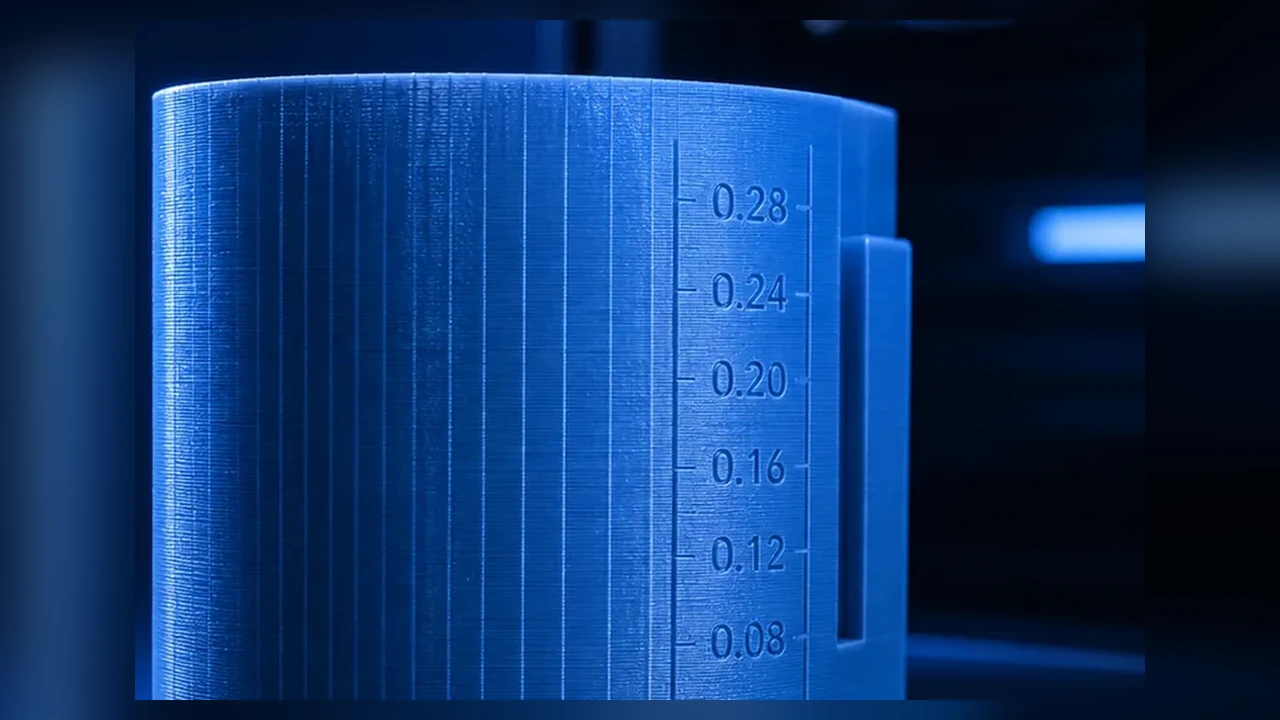
VFA means Vertical Fine Artifacts: fine, often periodic vertical texture on outer walls. It is frequently confused with ringing, Z-banding or ordinary layer lines even though the causes and useful fixes can be different.
The most useful clue is the pattern. VFA often appears as fine periodic stripes that change strongly with print speed. OrcaSlicer therefore provides a dedicated VFA Speed Test.
VFA, ringing, Z-banding or layer lines?
| Artifact | Typical pattern | Likely direction |
|---|---|---|
| VFA | fine periodic vertical stripes | motor/belt/motion behavior, speed |
| Ringing/Ghosting | waves after corners | resonance, acceleration, input shaping |
| Z-banding | horizontal periodic lines | Z mechanics, extrusion, periodic motion |
| normal layer lines | horizontal at each layer | FDM process, layer height, surface angle |
Why speed matters so much
Some motor/belt systems produce stronger periodic motion artifacts in particular speed ranges. A wall at 80 mm/s can look worse than the same wall at 120 mm/s, or the opposite. Faster is not automatically better; the goal is to identify bad speed ranges.
The OrcaSlicer VFA Speed Test
OrcaSlicer prints a tower with changing speed and wall angles. This reveals where the fine stripes become stronger or weaker. Record the start/end/step values and identify the calmest outer-wall range, then validate it on real geometry.
Mechanics and motion behavior
Motors, microsteps and drive behavior
VFA is often associated with stepper and motion-system characteristics, but that does not mean users should immediately change motor current, microsteps or driver settings. Your first lever is speed range, not blind firmware tuning.
Check belts and pulleys without over-tensioning
Damaged belts, rough idlers or loose pulleys can create or amplify periodic patterns. Check belt condition, pulley seating, idler noise and manufacturer tension guidance. “As tight as possible” is not a valid fix.
Why Input Shaper does not automatically fix VFA
Input Shaping primarily targets resonance that appears as ringing/ghosting after acceleration changes. VFA can have a different origin. Treat VFA and ringing as separate diagnoses.
Choose outer-wall speed deliberately
If the VFA test shows a clearly bad range, place outer-wall speed below or above it rather than slowing the whole print. Inner walls and infill can remain faster if flow and mechanics allow.
Acceleration and short segments
On short walls the printer may never reach the requested speed. A VFA result from long test walls may therefore differ from a small detailed model. Use G-code preview and real geometry.
CoreXY, bedslingers and other kinematics
VFA is not exclusive to one kinematic layout. CoreXY and cartesian systems couple motors and belts differently. Diagnose the repeatable pattern instead of relying on slogans about a printer type.
Practical visibility and false positives
Filament can make the pattern more visible
Glossy, silk or very reflective filaments can highlight subtle texture while matte filament may hide it. That does not necessarily mean the material caused the mechanical artifact.
Practical diagnostic workflow
- Separate VFA from ringing and Z-banding.
- Run OrcaSlicer VFA Speed Test.
- Record good and bad speed ranges.
- Inspect belts, pulleys and idlers for obvious issues.
- Move outer-wall speed out of the bad range.
- Validate on a real part.
- Only then consider deeper motor/firmware changes.
VFA on only one axis or motion direction?
If stripes appear mainly on surfaces produced by a particular motion direction, that is useful evidence. On Cartesian printers the effect may sometimes correlate with X or Y motion. On CoreXY, two motors are coupled into XY movement, so a simple “the X motor is bad” conclusion is often wrong.
This is why the different wall angles in the VFA test matter: they help reveal whether the artifact depends on motion direction.
Separate VFA from extrusion periodicity
Not every vertical texture comes from belts or motors. A damaged drive gear, eccentric filament feed or periodic flow variation can create repeating surface texture too. If the pattern changes very little across the VFA speed test, inspect extrusion consistency as well.
Why one photograph is rarely enough
VFA visibility depends heavily on lighting and filament. Glossy or silk material under side light can make a subtle pattern look dramatic while matte filament hides it. Keep lighting, material and wall orientation consistent for A/B comparisons.
Do not change four things at once
Changing belt tension, Input Shaper, motor current and wall speed together destroys the diagnostic value of the test. Change one variable at a time.
When a small amount of VFA is acceptable
On functional parts, a fine pattern visible only under grazing light may not justify slower printing or aggressive mechanical tuning. Optimize for the actual use case, not theoretical perfection.
Conclusion
VFA is best diagnosed through pattern and speed dependency. The OrcaSlicer VFA test is therefore a strong first step. Correct classification prevents unnecessary changes to Input Shaper, Z screws or firmware.


